.png)
Mobile APPs
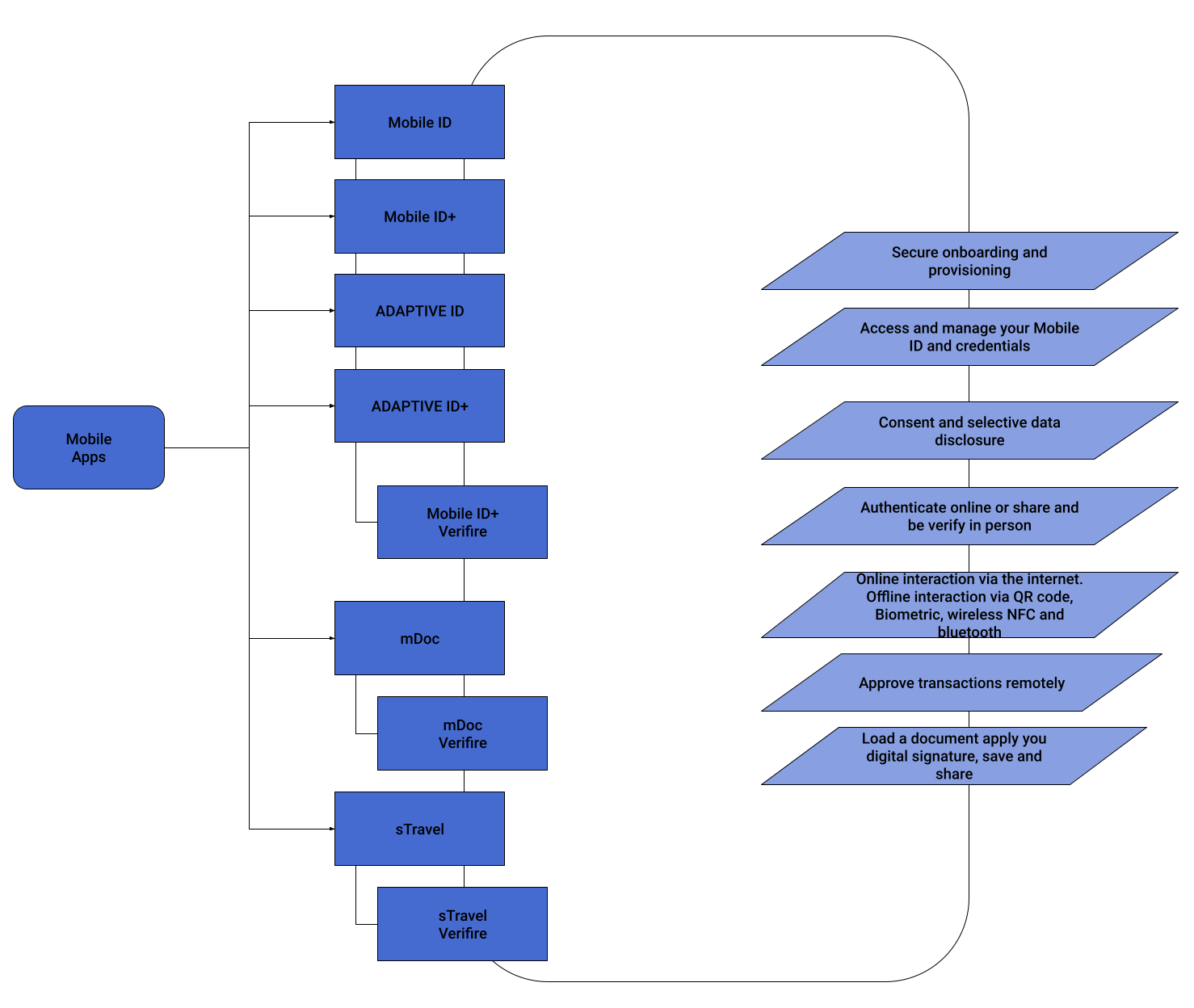
The DEMO HUB is integrated with various apps to enhance its functionality.
MOBILE ID
(This was previously referred to as mTSP)
The MOBILE ID App offers a secure digital identification solution with two-factor authentication and transaction confirmation, fully integrated with the ENTRUST Remote Signing Engine (formerly TrustedX eIDAS). This integration allows for mobile digital signatures with strong remote authorization. To activate the app, users need a DEMO HUB account with a Digital Certificate in the ENTRUST Remote Signing Engine. If you don't have an account, you can create one on the Landing page by clicking the [Get started now] button, which also generates your online Digital ID. After creating an account, download and start the app, and use your credentials to activate it and link it to your Digital ID.
The app's features include accessing your user profile to view account data and registration status, online authentication to consent and authorize remote signatures from other applications, and document signing. You can sign PDF documents from your mobile using the ENTRUST HUB Remote Signing Engine and share them. An optional step to enhance account security is recording your face biometrics, which can be done from the app's home screen. This increases your Registration Level and Identity Assurance Level, especially useful if you signed up through remote web enrollment.
Additionally, the app offers optional features like remote signing and transaction authorization, but these are not activated by default for the ENTRUST HUB Remote Signing Engine.
MOBILE ID+
(This was formerly known as mID+).
The MOBILE ID App is a versatile digital solution designed for secure remote onboarding and identity verification. It leverages electronic documents like ID cards and ePassports, alongside biometric technologies, to accurately verify identities and perform liveness checks. This makes it an invaluable tool for organizations requiring reliable methods to remotely verify new users or clients. Additionally, the app manages a variety of smart credentials, including derived identity documents and travel credentials, making it essential for users who need multiple forms of digital identification. Integrated with ENTRUST's cloud-based Identity as a Service (IDaaS), it enables seamless remote authentication and authorization, enhancing its utility for both individuals and organizations. The app also features various demo flows, providing step-by-step guides to showcase its diverse functionalities, aiding both new and existing users in navigating its features. Moreover, it offers the issuance of different digital credentials based on enrollment documents, adding flexibility for users who require diverse digital identifications for various purposes. Overall, the MOBILE ID App stands out as a comprehensive tool for digital identity verification, credential management, and remote authorization in today's digital and remote-oriented world.
MOBILE ID+ VERIFIER
(This was previously known as the mID+ Reader).
The MOBILE ID+ VERIFIER is a comprehensive and secure solution for authenticating information from both the MOBILE ID+ App and electronic documents, like National ID Cards. Integrated seamlessly with the DEMO HUB, it accesses the "demo" trustworthy database for reliable identity verification. The app supports various methods of verification, enhancing its adaptability and accuracy. Users can display their identity information and QR code on their mobile phones, which verifiers can scan to retrieve and confirm data. For deeper validation, the app performs online checks, enabling real-time verification of credentials and related information from central databases, including biometric data. Additionally, it utilizes NFC or Bluetooth for both online and offline verification, facilitating wireless communication between the user and the verifier. This process includes transmitting all necessary data, like the citizen's portrait. Furthermore, the app is capable of conducting biometric comparisons, performing a 1:1 match between the facial image in the Smart Credential, the live photo taken during verification, and the portrait in the central database. This multifaceted approach ensures a robust and user-friendly verification process, catering to a range of authentication needs.
mDoc HOLDER
Drawing inspiration from Google's Identity credential application, we present mDoc, an innovative alternative for the seamless generation and utilization of digital credentials. Our application mirrors the efficiency of mID+, featuring a streamlined onboarding process that ensures a secure and user-friendly experience.
The process initiates with capturing the MRZ code from the holder's ID, utilizing the same technique as Google's Identity credential application. Subsequently, the application reads the information stored on the NFC chip embedded in the document, ensuring a comprehensive retrieval of essential data. A key step involves capturing a photograph of the document holder, followed by a meticulous biometric comparison with the image extracted from the ID's chip. Additionally, users are prompted to define a personalized PIN for future interactions within the application.
It is important to note that our process does not necessitate prior registration on the Demo Hub and refrains from creating an identity within its database. Leveraging the capabilities of NFC technology, mDoc requires users to employ a smartphone equipped with this technology and a document containing a readable chip.
In essence, mDoc not only aligns with the high standards set by Google's Identity credential application but also offers a sophisticated and efficient means of digital credential management. Elevate your experience with mDoc, the epitome of secure and advanced mobile document handling.
mDoc READER
Introducing the mDoc Reader, a cutting-edge counterpart to the mID+ verifier, designed to empower users in reading and interpreting data shared through the mDoc Holder application. Unveiling versatility in its application, the mDoc Reader is adept at deciphering information encoded in QR codes or transmitted via NFC, setting new standards in flexibility and usability.
What sets the mDoc Reader apart is its adaptability across diverse use cases. Notably, it excels in extracting and presenting data from personal IDs, mobile driver's licenses, and can even be harnessed to swiftly verify the age of the document holder (such as over 18 or over 21). This level of versatility revolutionizes the scope of information available to the verifier, ensuring a comprehensive and efficient verification process.
In response to these expanded capabilities, the mDoc Reader takes a nuanced approach to presenting information to the verifier. By understanding the context of the verification task at hand—whether it's validating personal identification details or confirming the age of the individual—the mDoc Reader tailors its presentation, ensuring a seamless and secure user experience.
Seamless Travel
Seamless Travel, or sTravel for short, is an innovative application designed to enhance the travel experience for jet setters and adventurers alike. This application caters to travelers seeking to elevate their journeys by simplifying the often cumbersome airport processes. sTravel employs cutting-edge technology, such as NFC (Near Field Communication) and biometric scanning, to streamline the user onboarding process.
Upon registration, travelers provide their biometric data and establish their identity securely. Once registered, the application interfaces with the airport's security infrastructure. Specially designated sTravel hallways are equipped with security cameras, which can detect the presence of registered travelers by matching their faces with the airport's database. This seamless integration allows for a frictionless experience at the airport.
The primary use case of sTravel is to expedite the security and immigration processes, thereby eliminating the need for travelers to wait in long lines and endure the hassles of traditional airport settings. This efficient system verifies passengers' statuses and ensures they meet all necessary security checks, granting them priority access to various airport facilities. sTravel not only saves time but also enhances the overall travel experience, making it a valuable tool for those looking to optimize their journeys. Whether you're a frequent flyer or an occasional traveler, sTravel can make your airport experience smoother and more enjoyable.
NEED MORE APPS?
Other Apps are available upon request: IDV DEMO APP, MIFIRMA DEMO APP, ...
Our teams are here to help you combine ENTRUST and INTERFASE building blocks for new use cases. Reach out to us anytime for assistance.
How are THE DEMO Apps distributed?
You can install the DEMO Apps from Google Play Store, an Android APK file, iOS App Store, or iOS TestFlight.

Important Note:
Some DEMO HUB Apps are only be available in APK file formats for Android devices.
If you have a DEMO HUB User account, you can access APK files by visiting the DEMO HUB>User Portal>Utilities or Security sections. Another option is to download the latest version of the app's APK files from the designated folders. If you have a DEMO HUB User account, you can access APK files by visiting the DEMO HUB>User Portal>Utilities or Security sections. Another option is to download the latest version of the app's APK files from the following designated folders.
MOBILE ID
https://drive.google.com/drive/folders/1yJvj8KApDVxH6aJtZf59cJ8uhInRt5h6
MOBILE ID+
https://drive.google.com/drive/folders/1m7hCFK0kiKXJ0F0cFDGrIDRtMNSElBct?usp=sharing
MOBILE ID+ VERIFIER
https://drive.google.com/drive/folders/1egRTwNt4TqTMBuf23sHjsHW13tx-Fq1B
Check out our "AndroidApps Installation Guide.pdf" for help installing Android apps.
For the best experience with Demo Apps, we suggest using a smartphone that meets certain criteria. Your phone should have Android Version 11 or a newer version, a camera with a live-view resolution of at least 1.2 MP, a minimum of 4 CPU cores, 4 GB of RAM, ARM v7/v8 or a similar architecture, NFC functionality, and a storage capacity of at least 350 MB. For an enhanced user experience, it is also suggested to consider a smartphone with a reasonably sized display, such as a minimum of 5 inches or larger, to ensure comfortable viewing and interaction with the Demo Apps.